Start with intent.
Ask an everyday question, launch a supported command or speak through local English recognition.
The next chapter of working with Windows doesn't start with more complexity. It starts with a conversation—and you in control.
THE BEST INTERFACE IS THE ONE THAT GETS OUT OF YOUR WAY.
Not the other way around.
Voiceroom is built around a simple idea: supported everyday tasks should feel more natural, while consequential actions remain transparent and yours to approve.
02 / MEET YOUR NEW WORKSPACE
A real Windows workspace designed around clarity. A conversation when you want one. A visible plan when it matters.
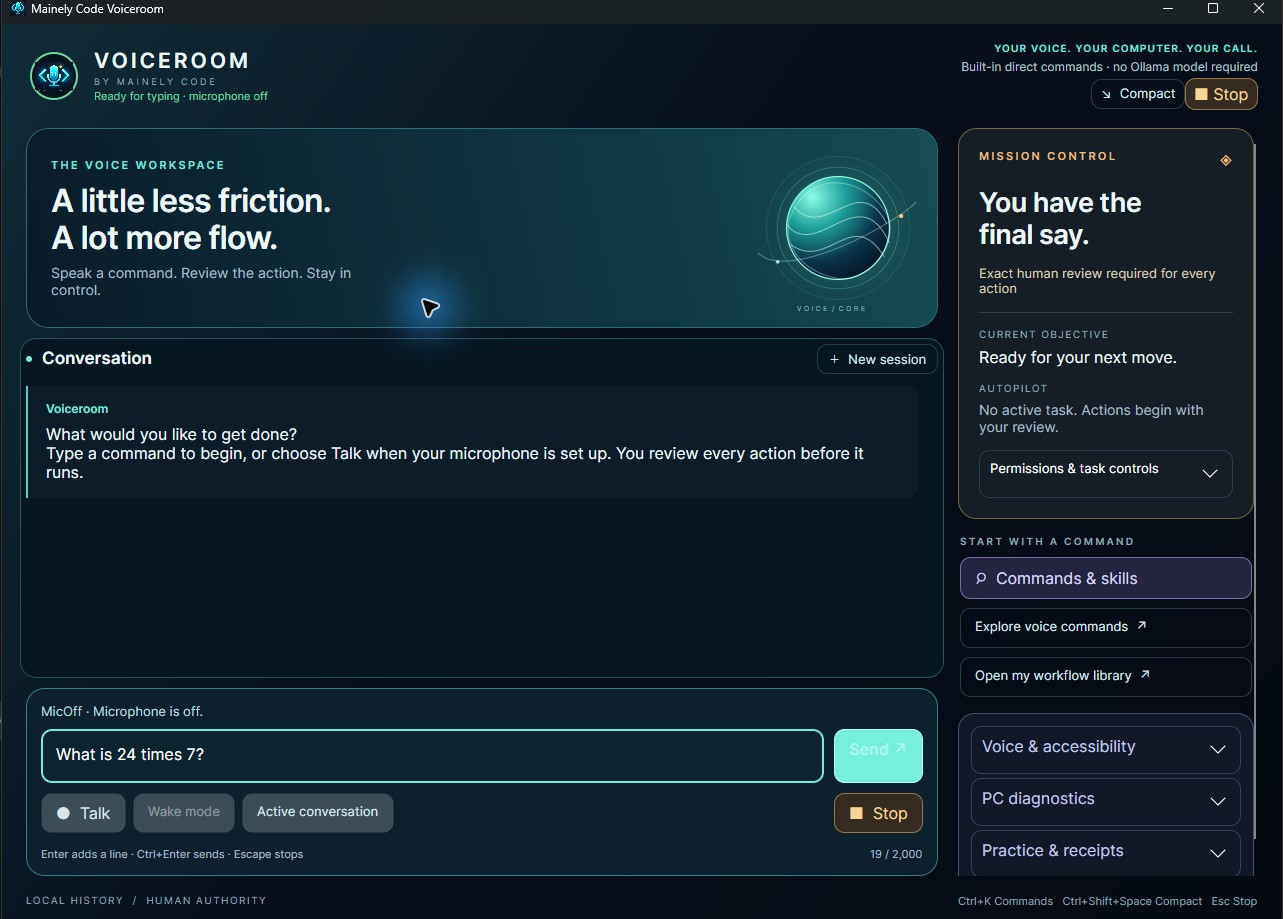
Ask an everyday question, launch a supported command or speak through local English recognition.
When desktop work requires approval, the intended action is shown before it starts.
Stop, correct or resume with a fresh review. Silence never becomes permission.
03 / LOCAL IS LIBERATING
Core voice commands run on your machine without needing an AI model for every instruction. Local recognition puts the spoken-word path closer to home, where it belongs.
SEE OUR PRIVACY APPROACH04 / EXPERIENCE THE THINKING
Choose a command and see a small, truthful illustration of how Voiceroom routes requests.
INTERACTIVE WEBSITE SIMULATION · NO LIVE AI OR COMPUTER ACTIONSIllustrative responses. This website does not access your microphone or desktop.
05 / MADE FOR THE WAY YOU WORK
Nothing flashy at the expense of function. Everything intentional, considered and grounded in the real app.
Exact review before governed desktop actions. Clear permission boundaries. No automatic approval from a model's words.
Local English speech recognition. No hosted speech service required for the standard voice path.
Everyday commands and quick answers don't require a separate generative model.
A full workspace for focus, a compact controller for the moments between.
Keyboard access, clear state, high-contrast preferences and readable text, built into the experience.
Optional experimental local-model integration, with core functionality independent of it.
06 / A DIFFERENT RELATIONSHIP WITH TECHNOLOGY
Privacy isn't a marketing mode. It's a decision about what needs to happen locally, what reaches the network, and who gets to approve the next step.
READ HOW VOICEROOM HANDLES DATALive samples are processed in memory, without a hosted speech-recognition service in the standard path.
You see the plan. You approve. Stop is always available, though completed actions cannot be undone.
Opening sites, performing web searches or downloading optional models uses the network when you request it.
07 / YOUR NEXT MOVE
Not another subscription to manage. A Windows experience built around local-first control and an honest relationship with the person behind the keyboard.

No. Supported everyday commands and English voice recognition work without a hosted AI service. Some intentionally requested actions, like web browsing or model downloads, involve the network.
No. The animated signal and command explorer are illustrations. This website does not request microphone access, run AI inference, or control your computer. The Windows application is separate.
No. Voiceroom supports defined commands and governed automation. It is not unrestricted unattended control, universal dictation, or a replacement for all accessibility technologies.
A trained wake-word model is not part of the standard qualified experience. Experimental interruption features are not advertised as dependable hands-free operation.
Voiceroom has a Microsoft Store product listing. Availability, release version, trial terms and price vary by region and are confirmed on the Store page. The latest engineering changes may still be in qualification.
BUILT IN MAINE. BUILT FOR PEOPLE.
Your voice. Your computer. Your call.